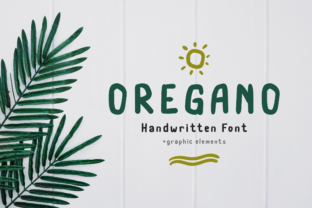
Oregano: A Natural Handwritten Font for Authentic, Human-Centered Design
Oregano isn’t just another script font—it’s a deliberate design choice for creators who value warmth, clarity, and intentionality. Designed to mimic the rhythm and variation of genuine handwriting, Oregano balances casual charm with strong legibility. It doesn’t shout; it invites. That makes it especially valuable in workflows where tone, trust, and human connection matter—whether you’re building a brand voice, designing learning materials, crafting a pitch deck, or publishing content that needs to feel grounded, not generic.
Where Oregano Fits in Your Creative Process
Fonts aren’t selected in isolation—they’re part of a sequence. You define your goal, understand your audience, choose your medium, then select tools that support both message and method. Oregano enters most naturally at the *refinement* stage: after wireframing or layout structure is settled, but before final export or handoff. It’s rarely the first font you try—but often the one that unlocks cohesion when earlier options feel too stiff, too decorative, or too impersonal.
For educators designing worksheets or slide decks, Oregano works well during the *review phase*: swapping in the font after content is drafted helps surface tone issues quickly. Does this lesson plan still feel approachable? Does this feedback note sound supportive, not clinical? Oregano’s subtle irregularities act as a built-in empathy check.
Marketers testing email subject lines or landing page headers often use Oregano in A/B variants—not for every element, but for key emotional touchpoints like testimonials, value statements, or CTA subtext. Its presence signals “this was written by a person, for people,” which can shift perception without changing a single word.
Using Oregano Before, During, and After Projects
Before: When planning a rebrand or launching a new product, include Oregano early in mood board development—not to lock in typography, but to calibrate visual tone. Pair it with muted color palettes, tactile textures, or photography with natural lighting. This helps teams align on “what feels right” before diving into grids, spacing systems, or responsive breakpoints.
During: In collaborative tools like Figma or Adobe XD, create a reusable Oregano text style with consistent letter-spacing (slightly open), line-height (1.4–1.6), and size hierarchy. Avoid scaling it beyond 36pt for headings or below 14pt for body—it’s optimized for mid-range readability. Use it selectively: headlines, pull quotes, handwritten-style annotations, or signature blocks. Resist the urge to apply it globally; its impact relies on contrast with cleaner, more functional fonts like Inter or Source Sans.
After: Once a project ships, revisit how Oregano performed in real use. Did users pause longer on sections set in Oregano? Did team members consistently misuse it—stretching it too thin or pairing it with clashing weights? Document those observations. Over time, this builds an internal “Oregano usage guide” tailored to your workflow, audience, and platform constraints.
Integration with Tools and Teams
Oregano is available as a web font (WOFF2) and desktop OTF/TTF, making it compatible with most modern design and publishing tools. It works reliably in Figma, Sketch, Illustrator, Canva (via upload), WordPress (with proper hosting or plugin support), and even Google Docs (via add-ons like Extensis Fonts). No special rendering plugins are needed—but do test fallback behavior. Define a clean sans-serif (e.g., system-ui, -apple-system, sans-serif) in your CSS stack so text remains readable if Oregano fails to load.
For teams, consistency starts with access and documentation. Store the font file in a shared assets folder with clear naming (oregano-regular.woff2, oregano-italic.woff2). Include a short usage note: “Use only for expressive elements—not body copy, data tables, or UI labels. Prefer OpenType features like contextual alternates for richer texture.” This prevents drift while preserving flexibility.
If you work with developers, share a lightweight CSS snippet they can drop into typography modules:
@font-face { font-family: 'Oregano'; src: url('oregano-regular.woff2') format('woff2'); font-weight: 400; font-style: normal; }- Define class names like
.heading-handwrittenor.quote-signature—not.oregano-text. Semantic naming reinforces purpose over appearance.
Practical Tips for Real-World Use
Start small. Add Oregano to one high-impact element in your next project—a course welcome message, a client proposal header, or the “About Me” section of your portfolio site. Measure response: Do readers comment on tone? Does engagement increase on that section? Let data—not instinct—guide expansion.
Respect its limits. Oregano isn’t built for dense paragraphs, code snippets, or accessibility-critical interfaces. Its lowercase g, q, and y have distinct tails—lovely in context, potentially confusing in isolation. Never use it for passwords, verification codes, or legal disclaimers where precision matters more than personality.
Pair intentionally. Oregano pairs best with neutral, highly legible sans-serifs—not other scripts or display fonts. Try it with Inter, Manrope, or IBM Plex Sans. Avoid pairing with fonts that compete for attention (e.g., another handwritten style or a bold geometric sans). The contrast should serve clarity, not novelty.
Optimize for output. If exporting to PDF for print or presentations, embed the font fully. For web, compress WOFF2 files using tools like woff2_compress—Oregano’s file size is modest (~45 KB), but every KB counts on slow connections. Monitor Core Web Vitals: lazy-load non-critical Oregano instances (e.g., decorative quotes below the fold).
Long-Term Use and Quality Control
Like any tool you rely on, Oregano benefits from periodic review. Every 6–12 months, ask: Is it still serving our goals? Has audience expectation shifted? Are newer fonts offering similar warmth with better language support or variable axes? Oregano currently supports Latin, Greek, and Cyrillic scripts—but lacks extended diacritics or Vietnamese support. If your work expands into those regions, evaluate alternatives early rather than retrofitting later.
Build quality control into your process. Add Oregano checks to your pre-launch checklist: “Is Oregano used only where human tone adds value? Is fallback visible and appropriate? Is contrast ratio ≥ 4.5:1 against background?” These aren’t aesthetic nitpicks—they’re functional safeguards for usability and inclusion.
Finally, remember that Oregano’s strength lies in restraint. Its power isn’t in how much you use it—but in how precisely it lands. A single line of Oregano in a minimalist email footer can convey more authenticity than three layers of branded graphics. That’s not magic. It’s thoughtful implementation—choosing the right tool, at the right time, for the right reason.
Getting Started Tomorrow
You don’t need a redesign or a strategy session to begin. Open your current project. Identify one place where warmth matters more than uniformity—a welcome banner, a testimonial highlight, a personal note in a newsletter. Swap in Oregano at 24pt, with 1.5 line-height and 2% letter-spacing. Preview it on mobile and desktop. Ask a colleague: “Does this feel more like a conversation—or less?” Their answer tells you more than any spec sheet.
Oregano won’t solve vague briefs or unclear goals. But when your process is grounded, your audience is understood, and your intent is specific, Oregano becomes a quiet amplifier—not a distraction, not a gimmick, but a deliberate, human-centered detail that earns its place.